NetBox — 系統架構
相關章節
1. 專案概覽
NetBox 是一套以 Python/Django 開發的網路基礎設施管理平台,涵蓋 IPAM(IP 位址管理)、DCIM(資料中心基礎設施管理)、Circuits(線路管理)、Virtualization(虛擬化)等領域。
| 項目 | 版本 / 規格 |
|---|---|
| NetBox | v4.5.7 |
| Python | ≥ 3.12(支援 3.12 / 3.13 / 3.14) |
| Django | 5.2.12 |
| Django REST Framework | 3.16.1 |
| GraphQL | Strawberry 0.312.2 + strawberry-graphql-django 0.82.1 |
| 資料庫 | PostgreSQL(必要,使用 psycopg 3.3.3) |
| 快取 / 佇列 | Redis(必要,django-redis 6.0.0 + django-rq 4.0.1) |
| WSGI Server | Gunicorn 25.3.0 |
| API Schema | drf-spectacular 0.29.0 |
版本資訊定義於 release.yaml 並透過 settings.py 載入:
# 檔案: netbox/netbox/settings.py (第 32 行)
VERSION = RELEASE.full_version  # Retained for backward compatibility
2. 系統架構圖
下圖展示 NetBox 的完整部署架構,從使用者請求到後端各元件之間的互動關係:
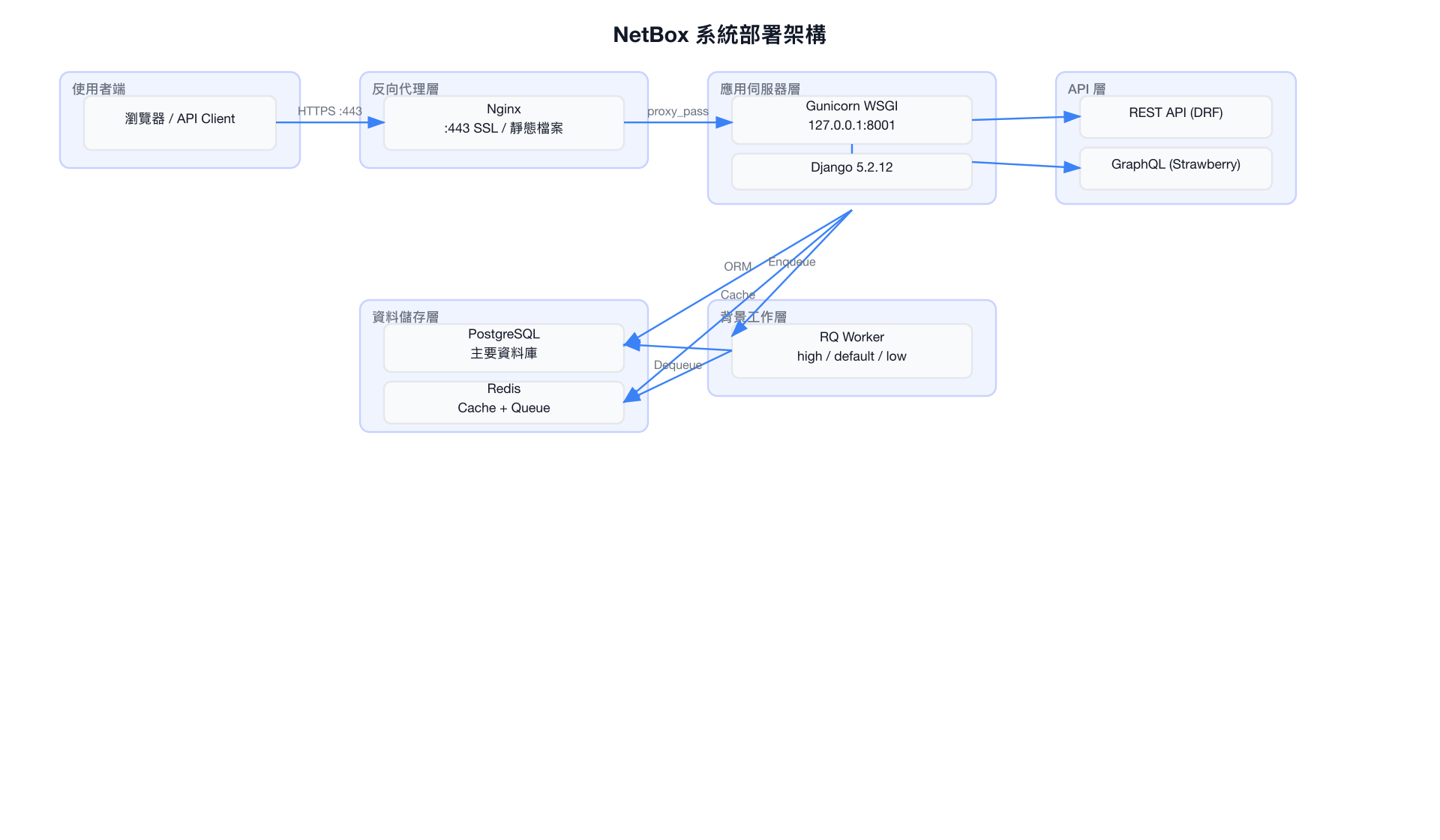
3. Django 應用模組
NetBox 將功能拆分為 12 個 Django 應用,各自負責特定的業務領域。以下是 INSTALLED_APPS 中的完整清單:
# 檔案: netbox/netbox/settings.py (第 432-468 行)
INSTALLED_APPS = [
    'django.contrib.auth',
    'django.contrib.contenttypes',
    'django.contrib.sessions',
    'django.contrib.messages',
    'django.contrib.staticfiles',
    'django.contrib.humanize',
    'django.forms',
    'corsheaders',
    'debug_toolbar',
    'django_filters',
    'django_htmx',
    'django_tables2',
    'django_prometheus',
    'strawberry_django',
    'mptt',
    'rest_framework',
    'social_django',
    'sorl.thumbnail',
    'taggit',
    'timezone_field',
    # ---- NetBox 自有應用 ----
    'core',
    'account',
    'circuits',
    'dcim',
    'ipam',
    'extras',
    'tenancy',
    'users',
    'utilities',
    'virtualization',
    'vpn',
    'wireless',
    'django_rq',           # Must come after extras to allow overriding management commands
    'drf_spectacular',
    'drf_spectacular_sidecar',
]
NetBox 12 個應用模組概覽
| 應用 | Model 數量 | 說明 |
|---|---|---|
| core | 7 | 資料來源(DataSource)、變更日誌、Job 管理、ObjectType |
| account | 0 (proxy) | 使用者帳戶管理,Token proxy model |
| circuits | 10 | 線路供應商(Provider)、線路(Circuit)、終端(Termination)、虛擬線路 |
| dcim | 53 | 資料中心基礎設施:Site、Rack、Device、Interface、Cable、Power 等 |
| ipam | 18 | IP 位址管理:Prefix、IPAddress、VLAN、VRF、ASN、Service 等 |
| extras | 19 | 擴充功能:CustomField、Webhook、EventRule、Tag、ConfigContext、Dashboard |
| tenancy | 6 | 多租戶管理:Tenant、TenantGroup、Contact、ContactRole |
| users | 6 | 使用者、群組、Token、Permission、Preference |
| utilities | — | 工具函式庫(無 Django Model),提供共用 helper |
| virtualization | 7 | 虛擬化管理:Cluster、VirtualMachine、VMInterface |
| vpn | 10 | VPN 管理:Tunnel、IKEPolicy、IPSecProfile、L2VPN |
| wireless | 4 | 無線網路:WirelessLAN、WirelessLANGroup、WirelessLink |
合計約 140 個 Model,提供 139+ 個 REST API ViewSet 端點及完整 GraphQL Schema。
4. 目錄結構
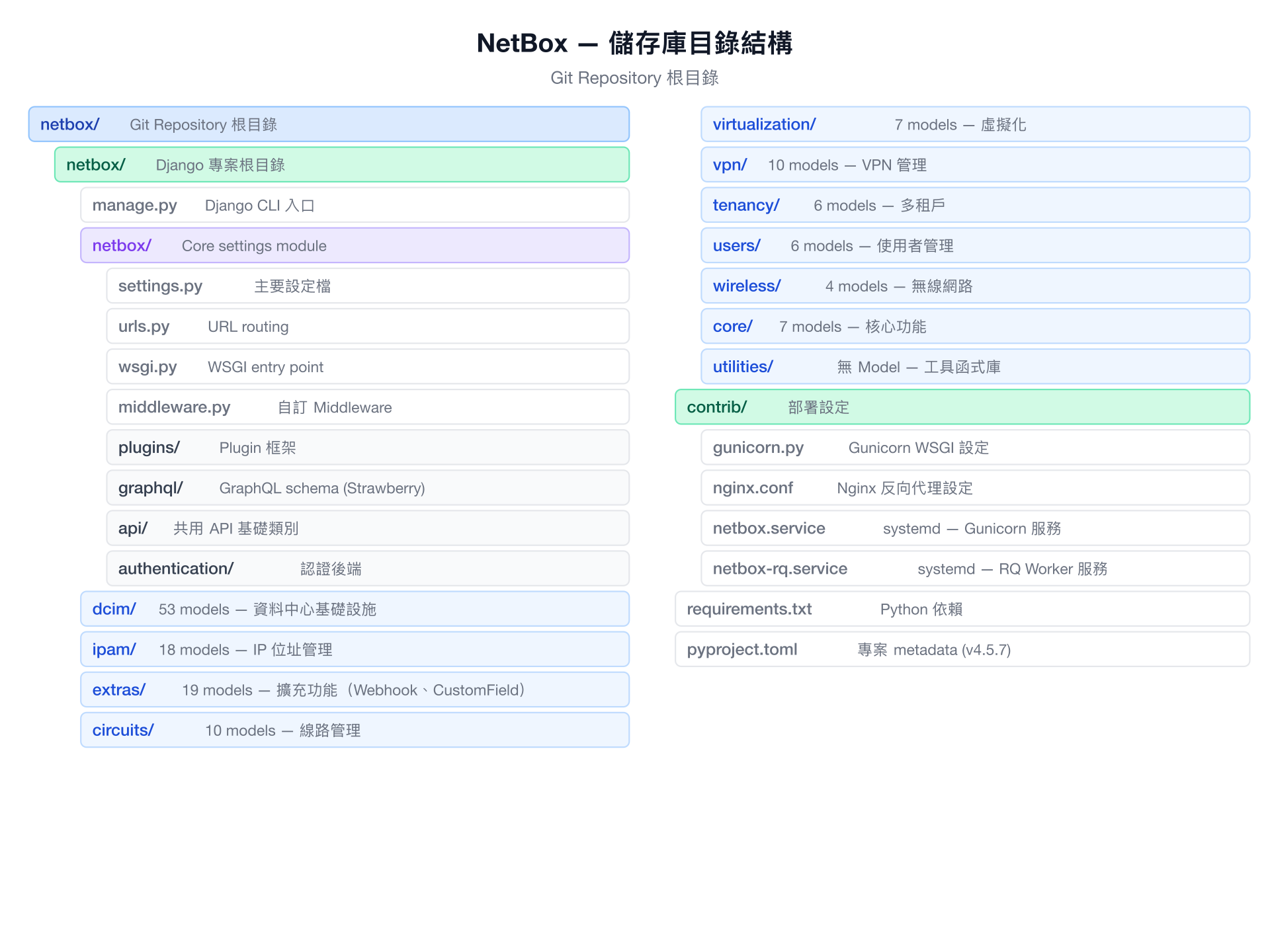
5. Middleware Pipeline
Django Middleware 是每個 HTTP 請求都必須通過的處理鏈。NetBox 的 Middleware 配置如下:
# 檔案: netbox/netbox/settings.py (第 473-501 行)
MIDDLEWARE = [
    'corsheaders.middleware.CorsMiddleware',                   # CORS 跨域請求處理
    'django.contrib.sessions.middleware.SessionMiddleware',    # Session 管理
    'django.middleware.locale.LocaleMiddleware',               # i18n 語言切換
    'django.middleware.common.CommonMiddleware',               # URL 正規化
    'django.middleware.csrf.CsrfViewMiddleware',               # CSRF 防護
    'django.contrib.auth.middleware.AuthenticationMiddleware', # 使用者驗證
    'django.contrib.messages.middleware.MessageMiddleware',    # Flash 訊息
    'django.middleware.clickjacking.XFrameOptionsMiddleware',  # Clickjacking 防護
    'django.middleware.security.SecurityMiddleware',           # 安全性標頭
    'django_htmx.middleware.HtmxMiddleware',                  # HTMX 整合
    'netbox.middleware.RemoteUserMiddleware',                  # 遠端使用者驗證
    'netbox.middleware.CoreMiddleware',                        # NetBox 核心邏輯
    'netbox.middleware.MaintenanceModeMiddleware',             # 維護模式控制
]

if DEBUG:
    MIDDLEWARE = [
        "strawberry_django.middlewares.debug_toolbar.DebugToolbarMiddleware",
        *MIDDLEWARE,
    ]

if METRICS_ENABLED:
    MIDDLEWARE = [
        'netbox.middleware.PrometheusBeforeMiddleware',
        *MIDDLEWARE,
        'netbox.middleware.PrometheusAfterMiddleware',
    ]
Middleware 處理流程

注意: 若啟用 Prometheus metrics,會在 Pipeline 的最前方及最後方各加入一個 Middleware 來計算請求處理時間。Plugin 也可以透過
middleware屬性注入自訂 Middleware。
6. Plugin 架構
Plugin 系統是 NetBox 最重要的擴充機制,允許第三方開發者在不修改核心程式碼的情況下增加功能。
6.1 PluginConfig 類別
所有 Plugin 必須繼承 PluginConfig(基於 Django AppConfig):
# 檔案: netbox/netbox/plugins/__init__.py (第 44-89 行)
class PluginConfig(AppConfig):
    """
    Subclass of Django's built-in AppConfig class, to be used for NetBox plugins.
    """
    # Plugin metadata
    author = ''
    author_email = ''
    description = ''
    version = ''
    release_track = ''

    # Root URL path under /plugins
    base_url = None

    # 版本相容性限制
    min_version = None
    max_version = None

    # 設定管理
    default_settings = {}
    required_settings = []

    # 擴充整合點
    middleware = []             # 注入額外 Middleware
    queues = []                # 專屬 RQ 佇列
    django_apps = []           # 附帶的 Django 應用
    events_pipeline = []       # 事件處理管線

    # 可選資源(自動探索或手動指定)
    search_indexes = None      # 搜尋索引
    data_backends = None       # 資料後端
    graphql_schema = None      # GraphQL Schema 擴充
    menu = None                # 導航選單
    menu_items = None          # 選單項目
    template_extensions = None # 模板擴充
    user_preferences = None    # 使用者偏好設定
6.2 資源自動探索
Plugin 的資源會依照預設路徑自動載入:
# 檔案: netbox/netbox/plugins/__init__.py (第 29-37 行)
DEFAULT_RESOURCE_PATHS = {
    'search_indexes': 'search.indexes',
    'data_backends': 'data_backends.backends',
    'graphql_schema': 'graphql.schema',
    'menu': 'navigation.menu',
    'menu_items': 'navigation.menu_items',
    'template_extensions': 'template_content.template_extensions',
    'user_preferences': 'preferences.preferences',
}
例如,若 Plugin 名為 my_plugin,系統會嘗試從 my_plugin.search.indexes 載入搜尋索引。
6.3 Plugin 載入流程
Plugin 的載入在 settings.py 中完成,每個 Plugin 經過嚴格的驗證流程:
# 檔案: netbox/netbox/settings.py (第 870-951 行,簡化)
for plugin_name in PLUGINS:
    # 1. 匯入 plugin module
    plugin = importlib.import_module(plugin_name)

    # 2. 取得 PluginConfig
    plugin_config: PluginConfig = plugin.config

    # 3. 驗證版本相容性與使用者設定
    plugin_config.validate(PLUGINS_CONFIG[plugin_name], RELEASE.version)

    # 4. 註冊為已安裝
    registry['plugins']['installed'].append(plugin_name)

    # 5. 載入附帶的 Django apps
    django_apps = plugin_config.django_apps
    INSTALLED_APPS.extend(django_apps)

    # 6. 注入 Middleware
    plugin_middleware = plugin_config.middleware
    if plugin_middleware and type(plugin_middleware) in (list, tuple):
        MIDDLEWARE.extend(plugin_middleware)

    # 7. 建立專屬 RQ 佇列(前綴為 plugin 名稱)
    RQ_QUEUES.update({
        f"{plugin_name}.{queue}": RQ_PARAMS for queue in plugin_config.queues
    })

    # 8. 註冊事件處理管線
    events_pipeline = plugin_config.events_pipeline
    if events_pipeline:
        EVENTS_PIPELINE.extend(events_pipeline)
6.4 Plugin 整合點一覽
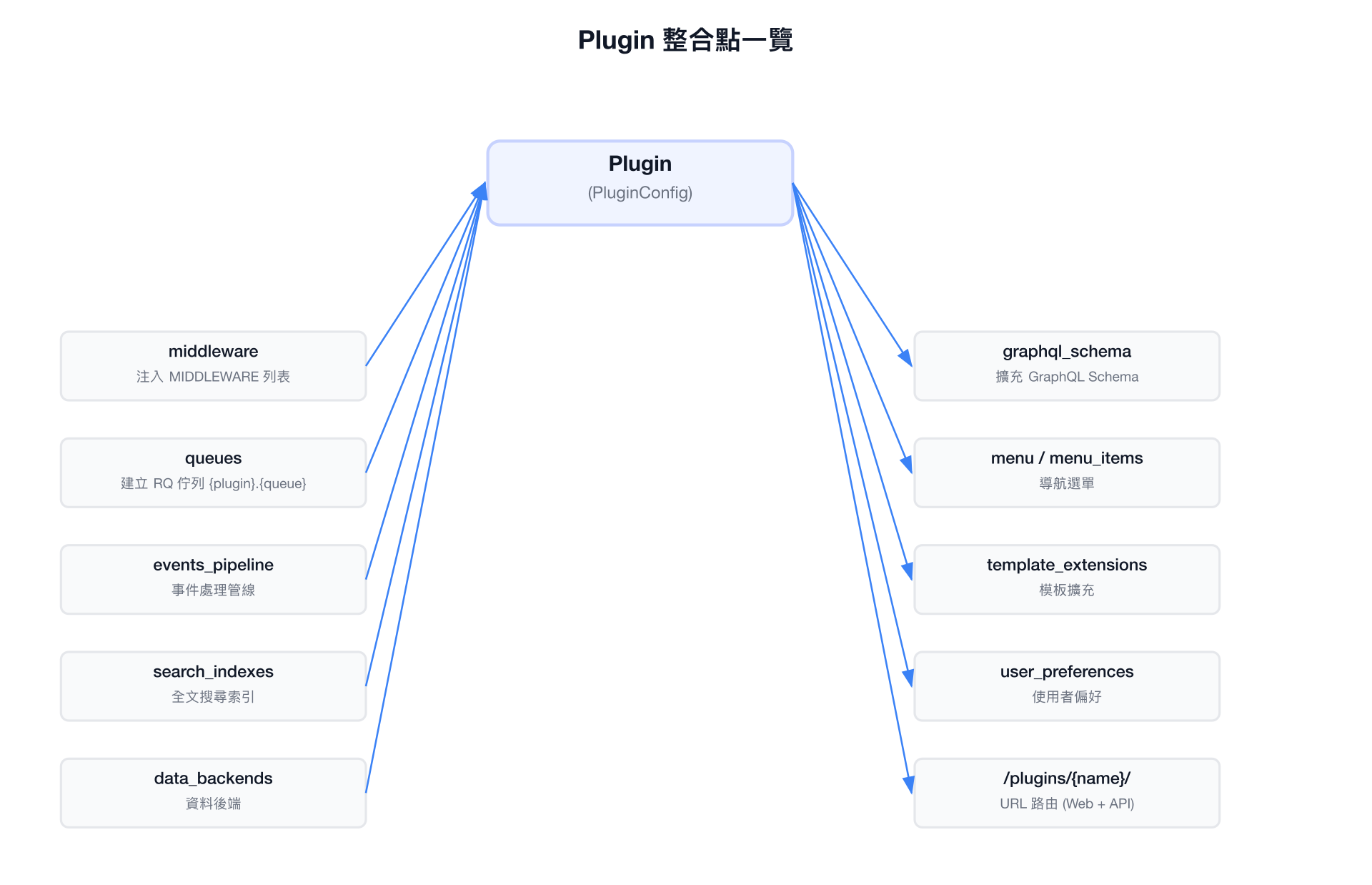
7. 部署架構
7.1 Gunicorn WSGI 設定
# 檔案: netbox/contrib/gunicorn.py
# The IP address (typically localhost) and port that the NetBox WSGI process should listen on
bind = '127.0.0.1:8001'

# Number of gunicorn workers to spawn. This should typically be 2n+1, where
# n is the number of CPU cores present.
workers = 5

# Number of threads per worker process
threads = 3

# Timeout (in seconds) for a request to complete
timeout = 120

# The maximum number of requests a worker can handle before being respawned
max_requests = 5000
max_requests_jitter = 500
7.2 Systemd 服務
NetBox WSGI 服務(Gunicorn):
# 檔案: netbox/contrib/netbox.service
[Unit]
Description=NetBox WSGI Service
Documentation=https://docs.netbox.dev/
After=network-online.target
Wants=network-online.target

[Service]
Type=simple
User=netbox
Group=netbox
PIDFile=/var/tmp/netbox.pid
WorkingDirectory=/opt/netbox
ExecStart=/opt/netbox/venv/bin/gunicorn --pid /var/tmp/netbox.pid \
    --pythonpath /opt/netbox/netbox \
    --config /opt/netbox/gunicorn.py netbox.wsgi
Restart=on-failure
RestartSec=30
PrivateTmp=true

[Install]
WantedBy=multi-user.target
NetBox RQ Worker 服務(背景任務處理):
# 檔案: netbox/contrib/netbox-rq.service
[Unit]
Description=NetBox Request Queue Worker
Documentation=https://docs.netbox.dev/
After=network-online.target
Wants=network-online.target

[Service]
Type=simple
User=netbox
Group=netbox
WorkingDirectory=/opt/netbox
ExecStart=/opt/netbox/venv/bin/python3 /opt/netbox/netbox/manage.py \
    rqworker high default low
Restart=on-failure
RestartSec=30
PrivateTmp=true

[Install]
WantedBy=multi-user.target
RQ Worker 監聽三個優先級佇列:high、default、low,依序處理任務。
7.3 Nginx 反向代理
# 檔案: netbox/contrib/nginx.conf
server {
    listen [::]:443 ssl ipv6only=off;
    server_name netbox.example.com;

    ssl_certificate /etc/ssl/certs/netbox.crt;
    ssl_certificate_key /etc/ssl/private/netbox.key;

    client_max_body_size 25m;

    # 靜態檔案由 Nginx 直接提供
    location /static/ {
        alias /opt/netbox/netbox/static/;
    }

    # 動態請求轉發至 Gunicorn
    location / {
        proxy_pass http://127.0.0.1:8001;
        proxy_set_header X-Forwarded-Host $http_host;
        proxy_set_header X-Real-IP $remote_addr;
        proxy_set_header X-Forwarded-Proto $scheme;
    }
}

server {
    # HTTP → HTTPS 重新導向
    listen [::]:80 ipv6only=off;
    server_name _;
    return 301 https://$host$request_uri;
}
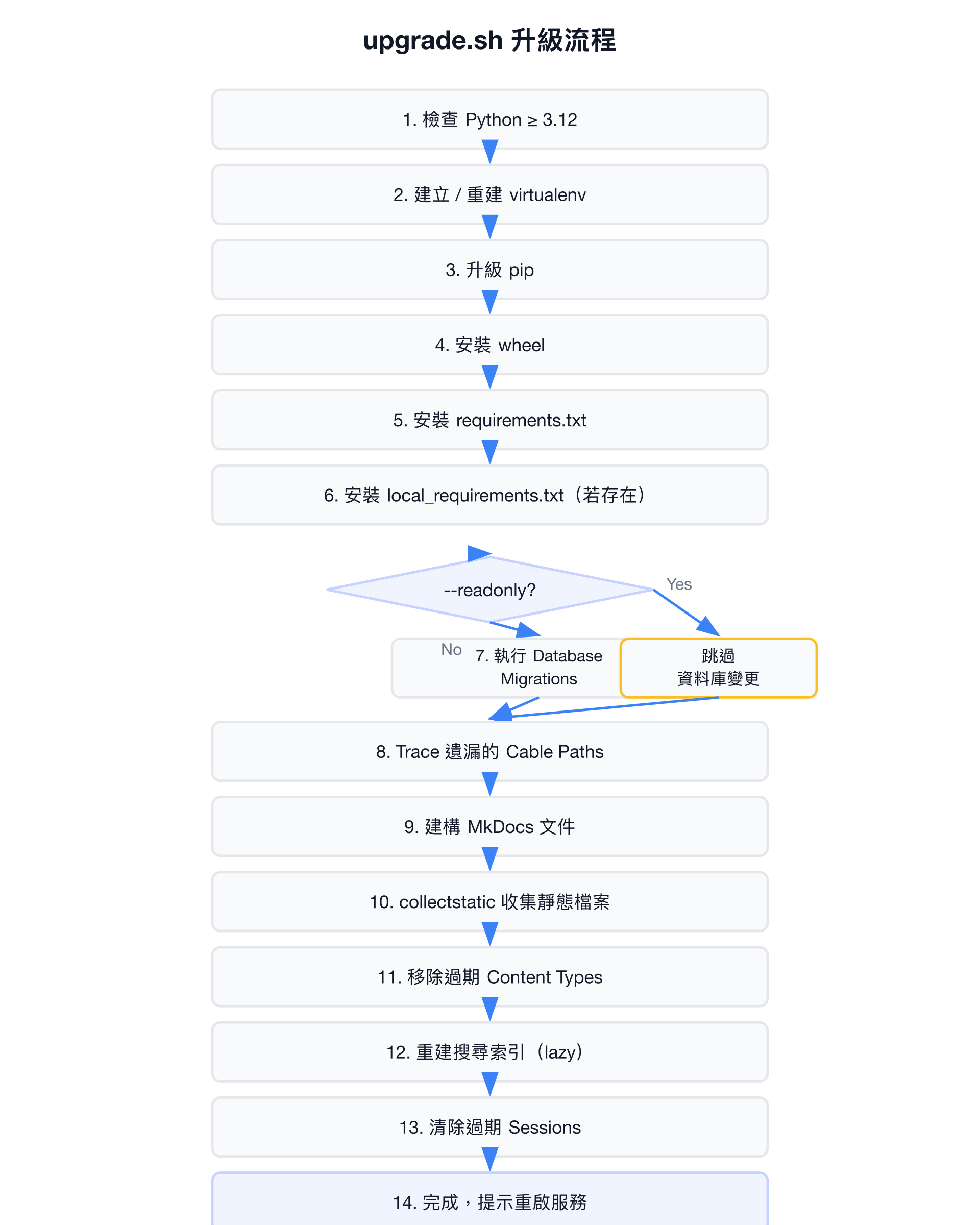
7.4 升級流程(upgrade.sh)
upgrade.sh 是 NetBox 官方提供的一鍵升級腳本,支援 --readonly 旗標跳過資料庫變更:
8. 設定管理
8.1 設定檔載入機制
NetBox 透過環境變數 NETBOX_CONFIGURATION 指定設定模組路徑,預設為 netbox.configuration:
# 檔案: netbox/netbox/settings.py (第 46-56 行)
config_path = os.getenv('NETBOX_CONFIGURATION', 'netbox.configuration')
try:
    configuration = importlib.import_module(config_path)
except ModuleNotFoundError as e:
    if getattr(e, 'name') == config_path:
        raise ImproperlyConfigured(
            f"Specified configuration module ({config_path}) not found. "
            f"Please define netbox/netbox/configuration.py per the documentation, "
            f"or specify an alternate module in the NETBOX_CONFIGURATION environment variable."
        )
    raise
8.2 必要設定參數
| 參數 | 說明 |
|---|---|
ALLOWED_HOSTS | 允許的 HTTP Host 標頭列表 |
SECRET_KEY | Django 密鑰,用於加密 Session 與 Token |
DATABASE / DATABASES | PostgreSQL 連線設定 |
REDIS | Redis 連線設定(cache + task queue) |
8.3 動態設定(ConfigRevision)
部分設定可透過 Web UI 動態修改,儲存在資料庫的 ConfigRevision model 中,無需重啟服務:
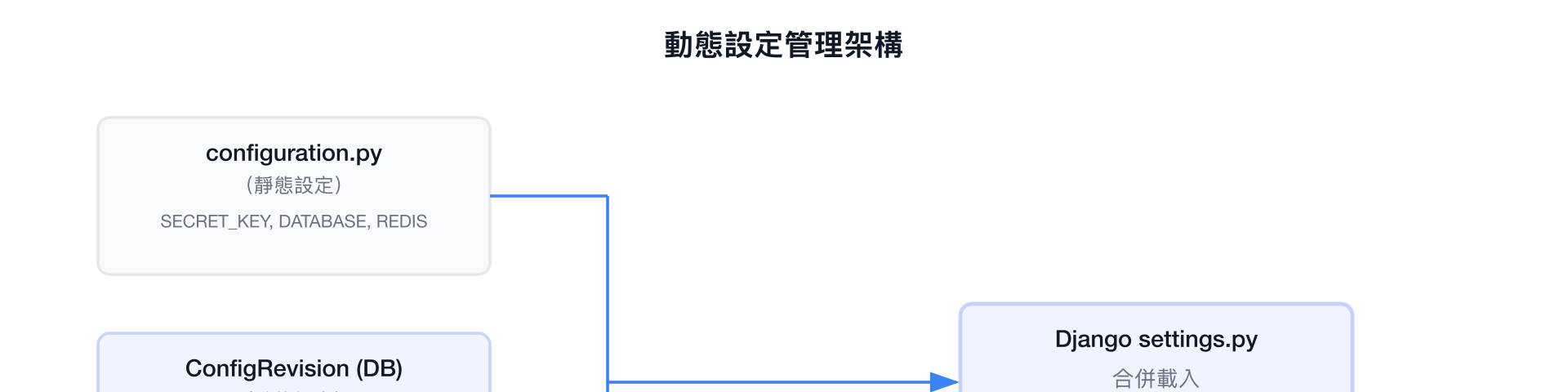
靜態設定(如資料庫連線、密鑰)必須寫在 configuration.py 中;而顯示相關、功能開關等參數可在 Admin UI 中即時調整,由 ConfigRevision model 管理版本歷史。
小結
NetBox v4.5.7 是一個成熟的 Django 應用,其架構設計有以下特點:
- 模組化設計 — 12 個 Django App 各司其職,涵蓋網路基礎設施的所有面向
- 完善的 Plugin 系統 — 透過
PluginConfig提供 9 個整合點(middleware、queues、events_pipeline、search_indexes、graphql_schema、menu、template_extensions、data_backends、user_preferences),讓第三方擴充無需修改核心程式碼 - 雙 API 層 — 同時支援 REST(DRF)與 GraphQL(Strawberry),提供 139+ 個 ViewSet 端點
- Production-Ready 部署 — 內建 Gunicorn、Nginx、systemd 設定檔與一鍵升級腳本
- 彈性設定管理 — 靜態設定檔搭配資料庫動態設定(ConfigRevision),兼顧安全性與靈活性
- 背景任務處理 — 透過 Redis + RQ 實現三級優先佇列(high / default / low),Plugin 可註冊專屬佇列