NetBox — 資料模型分析
NetBox 使用 Django ORM 定義超過 115 個 Model,橫跨 12 個 Django App,涵蓋資料中心基礎設施(DCIM)、IP 位址管理(IPAM)、線路管理、VPN、多租戶等領域。本文深入剖析其核心 Model、欄位定義、關聯關係、Mixin 架構以及 Migration 模式。
相關章節
1. 模型總覽
NetBox 將資料模型分散在 10 個主要 Django App 中,每個 App 負責特定領域的資料建模:
| App | Model 數量 | 說明 |
|---|---|---|
dcim | 31 | 資料中心基礎設施(Device、Rack、Cable 等) |
extras | 22 | 擴充功能(Custom Fields、Tags、Webhooks、Export Templates) |
ipam | 18 | IP 位址管理(Prefix、IPAddress、VLAN、VRF) |
circuits | 10 | 線路管理(Circuit、Provider、CircuitTermination) |
vpn | 9 | VPN 設定(Tunnel、TunnelTermination、IKE/IPSec) |
core | 7 | 核心基礎(DataSource、Job、ObjectChange) |
tenancy | 6 | 多租戶(Tenant、TenantGroup、Contact) |
virtualization | 4 | 虛擬化(Cluster、VirtualMachine、VMInterface) |
wireless | 4 | 無線網路(WirelessLAN、WirelessLink) |
users | 4 | 使用者與權限(Token、ObjectPermission) |
所有 Model 皆繼承自統一的基礎類別體系,確保一致的行為(如 Change Logging、Custom Fields、Tagging)。
基礎類別繼承架構
# 檔案: netbox/netbox/models/__init__.py
# 簡化繼承關係

BaseModel
├── ChangeLoggedModel        # 輕量級,用於輔助模型
└── NetBoxModel              # 完整功能集(繼承 NetBoxFeatureSet)
    ├── PrimaryModel         # 實體基礎設施物件(含 description、comments)
    │   └── Device, Prefix, IPAddress, Cable ...
    ├── OrganizationalModel  # 分類/組織物件
    │   └── Site, Region, Tenant, Role ...
    └── NestedGroupModel     # 階層式物件(使用 MPTT)
        └── Region, Location, TenantGroup ...
2. DCIM 模型關係圖
DCIM(Data Center Infrastructure Management)是 NetBox 最龐大的 App,包含 31 個 Model。以下 ERD 呈現核心實體之間的關聯:
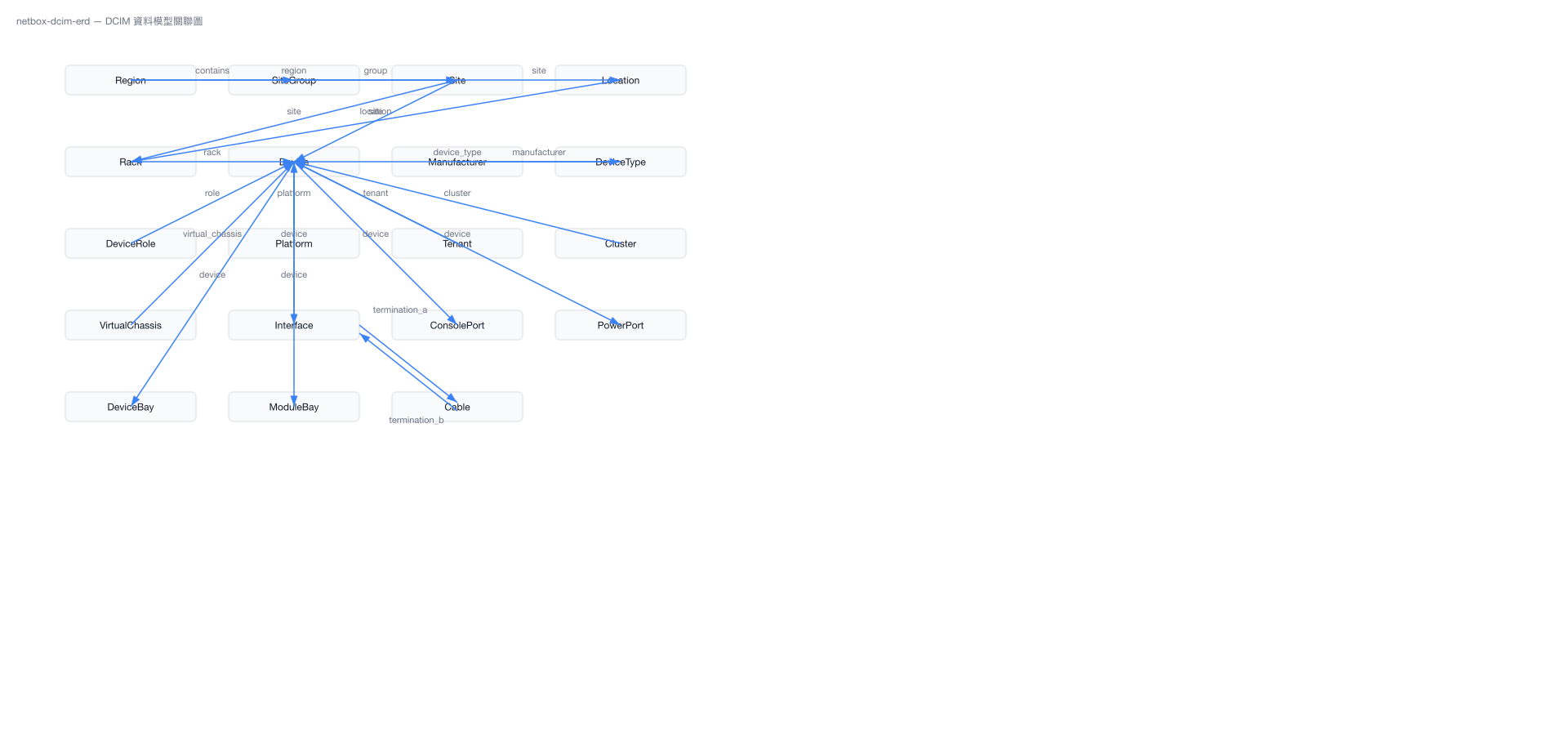
關鍵路徑說明
- 地理階層:
Region→SiteGroup→Site→Location→Rack→Device - 設備定義:
Manufacturer→DeviceType→Device,DeviceType 作為設備「型號」定義硬體規格 - 線纜路徑:
Device→Interface→Cable→Interface→Device,支援完整的端對端追蹤 - LAG 聚合:
Interface透過自參照 ForeignKey(lag)建立 Link Aggregation Group 關係
3. IPAM 模型關係圖
IPAM(IP Address Management)管理 IP 位址空間、VLAN、VRF 等網路資源:
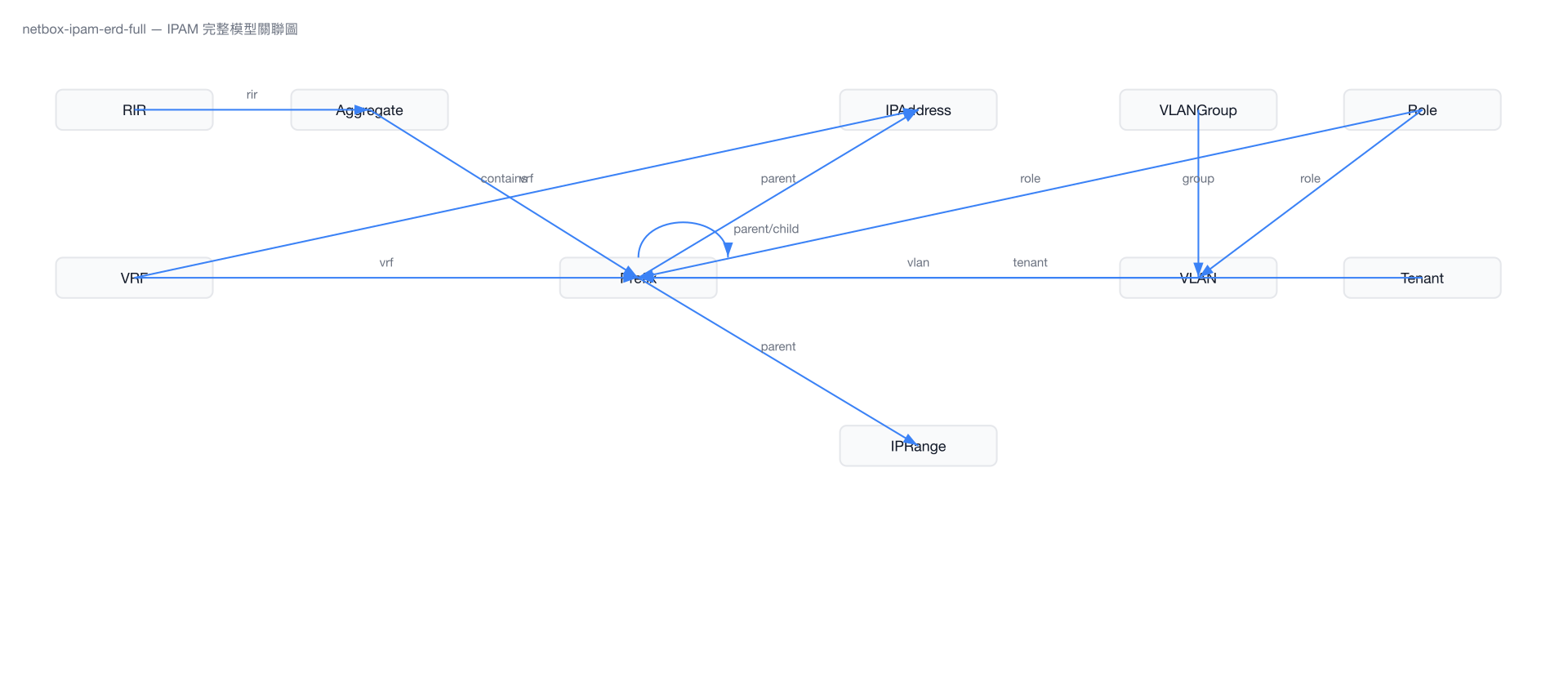
Prefix 層級嵌套
Prefix Model 透過 _depth 和 _children 欄位實現高效的階層查詢。NetBox 在每次 Prefix 儲存時自動維護這些快取欄位,支援如下查詢模式:
- 向上查詢:
get_parents()取得所有包含此 Prefix 的父級 - 向下查詢:
get_children()取得所有被此 Prefix 包含的子級 - 可用 IP:
get_available_ips()計算前綴內的可用 IP 位址 - 使用率:
get_utilization()以百分比呈現 Prefix 使用狀況
4. 核心模型深度分析
4.1 Device Model — 最複雜的核心模型
Device 是 NetBox 最核心的 Model,擁有超過 33 個欄位,涵蓋物理位置、網路配置、設備元件計數等面向。
類別繼承鏈:
# 檔案: netbox/netbox/dcim/models/devices.py
class Device(
    ContactsMixin,
    ImageAttachmentsMixin,
    RenderConfigMixin,
    ConfigContextModel,
    TrackingModelMixin,
    PrimaryModel
):
    ...
欄位定義總覽
| 欄位名稱 | 類型 | 說明 |
|---|---|---|
name | CharField(64) | 設備名稱(可為空) |
device_type | ForeignKey → DeviceType | 設備型號(硬體規格定義) |
role | ForeignKey → DeviceRole | 設備角色(如 Router、Switch) |
site | ForeignKey → Site | 所在站點 |
location | ForeignKey → Location | 機房位置(可選) |
rack | ForeignKey → Rack | 機櫃(可選) |
position | DecimalField(4,1) | 機櫃 U 位(如 12.0) |
face | CharField(50) | 安裝面(前/後) |
status | CharField(50) | 狀態(active、planned、staged 等) |
airflow | CharField(50) | 氣流方向(前到後/後到前) |
tenant | ForeignKey → Tenant | 所屬租戶(可選) |
platform | ForeignKey → Platform | 平台/OS(可選) |
serial | CharField(50) | 序號 |
asset_tag | CharField(50) | 資產標籤(唯一) |
primary_ip4 | OneToOneField → IPAddress | 主要 IPv4 位址 |
primary_ip6 | OneToOneField → IPAddress | 主要 IPv6 位址 |
oob_ip | OneToOneField → IPAddress | Out-of-Band 管理 IP |
cluster | ForeignKey → Cluster | 虛擬化叢集(可選) |
virtual_chassis | ForeignKey → VirtualChassis | 虛擬機箱(可選) |
vc_position | PositiveIntegerField | 虛擬機箱中的位置 |
vc_priority | PositiveSmallIntegerField | 虛擬機箱優先級 |
latitude | DecimalField(8,6) | 緯度 |
longitude | DecimalField(9,6) | 經度 |
Counter Cache 欄位
Device 使用 CounterCacheField 快取關聯元件計數,避免昂貴的 COUNT 查詢:
# 檔案: netbox/netbox/dcim/models/devices.py
console_port_count = CounterCacheField(
    to_model='dcim.ConsolePort', to_field='device'
)
console_server_port_count = CounterCacheField(
    to_model='dcim.ConsoleServerPort', to_field='device'
)
power_port_count = CounterCacheField(
    to_model='dcim.PowerPort', to_field='device'
)
power_outlet_count = CounterCacheField(
    to_model='dcim.PowerOutlet', to_field='device'
)
interface_count = CounterCacheField(
    to_model='dcim.Interface', to_field='device'
)
front_port_count = CounterCacheField(
    to_model='dcim.FrontPort', to_field='device'
)
rear_port_count = CounterCacheField(
    to_model='dcim.RearPort', to_field='device'
)
device_bay_count = CounterCacheField(
    to_model='dcim.DeviceBay', to_field='device'
)
module_bay_count = CounterCacheField(
    to_model='dcim.ModuleBay', to_field='device'
)
inventory_item_count = CounterCacheField(
    to_model='dcim.InventoryItem', to_field='device'
)
關鍵方法
clean() — 資料驗證
# 檔案: netbox/netbox/dcim/models/devices.py
def clean(self):
    super().clean()
    # 1. 驗證 Site / Location / Rack 的層級一致性
    #    如果指定了 Rack,自動繼承其 Site 和 Location
    # 2. 驗證 Rack 中的 position 和 face 必須同時存在
    # 3. 檢查設備是否符合 DeviceType 的尺寸限制
    # 4. 驗證 Virtual Chassis 相關欄位的一致性
save() — 儲存邏輯
# 檔案: netbox/netbox/dcim/models/devices.py
def save(self, *args, **kwargs):
    # 1. 從 DeviceType 繼承 airflow 和 platform(若未指定)
    # 2. 從 Rack 繼承 Location(若未指定)
    # 3. 新建設備時自動建立所有關聯元件
    #    (ConsolePort、PowerPort、Interface 等,依 DeviceType 定義)
    super().save(*args, **kwargs)
設計考量
Device 的 save() 方法在新建設備時會根據 DeviceType 的模板,自動實例化所有元件(Interface、ConsolePort 等)。這意味著選擇正確的 DeviceType 是建立設備的關鍵步驟。
4.2 Interface Model
Interface 是 DCIM 中連接設備與網路的核心元件,支援多種介面類型、LAG 聚合與 VLAN 指派。
# 檔案: netbox/netbox/dcim/models/device_components.py
class Interface(
    InterfaceValidationMixin,
    ModularComponentModel,
    BaseInterface,
    CabledObjectModel,
    PathEndpoint,
    TrackingModelMixin,
):
    ...
核心欄位
| 欄位名稱 | 類型 | 說明 |
|---|---|---|
name | CharField(64) | 介面名稱(如 eth0、GigabitEthernet0/1) |
type | CharField(50) | 介面類型(1GE-SFP、10GE-SFP+、25GE-SFP28 等) |
speed | PositiveBigIntegerField | 速率(Kbps) |
duplex | CharField(50) | 雙工模式(half/full/auto) |
mgmt_only | BooleanField | 是否僅用於管理 |
wwn | WWNField | World Wide Name(FC 用) |
poe_mode | CharField(50) | PoE 模式 |
poe_type | CharField(50) | PoE 類型 |
LAG 支援
# 檔案: netbox/netbox/dcim/models/device_components.py
lag = models.ForeignKey(
    to='self',
    on_delete=models.SET_NULL,
    related_name='member_interfaces',
    null=True,
    blank=True
)
# 透過自參照 ForeignKey 實現 LAG 聚合
# 查詢成員介面:lag_interface.member_interfaces.all()
VLAN 指派(繼承自 BaseInterface)
# 檔案: netbox/netbox/dcim/models/component_models.py
mode = models.CharField(
    max_length=50,
    choices=InterfaceModeChoices,
    blank=True, null=True
)  # IEEE 802.1Q 模式:access / tagged / tagged-all

untagged_vlan = models.ForeignKey(
    to='ipam.VLAN',
    on_delete=models.SET_NULL,
    related_name='%(class)ss_as_untagged',
    null=True, blank=True
)  # Native VLAN(Access 或 Trunk Native)

tagged_vlans = models.ManyToManyField(
    to='ipam.VLAN',
    related_name='%(class)ss_as_tagged',
    blank=True
)  # Tagged VLANs(Trunk 模式)

qinq_svlan = models.ForeignKey(
    to='ipam.VLAN',
    on_delete=models.SET_NULL,
    related_name='%(class)ss_svlan',
    null=True, blank=True
)  # Q-in-Q Service VLAN

vlan_translation_policy = models.ForeignKey(
    to='ipam.VLANTranslationPolicy',
    on_delete=models.PROTECT,
    null=True, blank=True
)
無線與 IP 相關欄位
# 檔案: netbox/netbox/dcim/models/device_components.py
rf_role = models.CharField(max_length=30, choices=WirelessRoleChoices, blank=True, null=True)
rf_channel = models.CharField(max_length=50, choices=WirelessChannelChoices, blank=True, null=True)
rf_channel_frequency = models.DecimalField(max_digits=7, decimal_places=2, blank=True, null=True)
rf_channel_width = models.DecimalField(max_digits=7, decimal_places=3, blank=True, null=True)
tx_power = models.SmallIntegerField(blank=True, null=True)

wireless_link = models.ForeignKey(
    to='wireless.WirelessLink', on_delete=models.SET_NULL, blank=True, null=True
)
wireless_lans = models.ManyToManyField(
    to='wireless.WirelessLAN', related_name='interfaces', blank=True
)

vrf = models.ForeignKey(
    to='ipam.VRF', on_delete=models.SET_NULL, null=True, blank=True
)

ip_addresses = GenericRelation(
    to='ipam.IPAddress',
    content_type_field='assigned_object_type',
    object_id_field='assigned_object_id'
)
4.3 Prefix Model
Prefix 管理 IP 前綴空間,支援階層式嵌套和使用率追蹤。
# 檔案: netbox/netbox/ipam/models/ip.py
class Prefix(
    ContactsMixin,
    GetAvailablePrefixesMixin,
    CachedScopeMixin,
    PrimaryModel
):
    ...
欄位定義
| 欄位名稱 | 類型 | 說明 |
|---|---|---|
prefix | IPNetworkField | IPv4/IPv6 網路位址(含遮罩) |
vrf | ForeignKey → VRF | 所屬 VRF(可選,null = Global) |
tenant | ForeignKey → Tenant | 所屬租戶 |
vlan | ForeignKey → VLAN | 關聯 VLAN |
status | CharField(50) | 狀態(active、reserved、deprecated、container) |
role | ForeignKey → Role | 角色 |
is_pool | BooleanField | 是否為 IP Pool(所有 IP 皆可分配) |
mark_utilized | BooleanField | 強制標記為已完全使用 |
_depth | PositiveSmallIntegerField | 階層深度(自動快取) |
_children | PositiveBigIntegerField | 子前綴數量(自動快取) |
階層查詢方法
# 檔案: netbox/netbox/ipam/models/ip.py

def get_parents(self, include_self=False):
    """回傳所有包含此 Prefix 的父級前綴"""

def get_children(self, include_self=False):
    """回傳所有被此 Prefix 包含的子級前綴"""

def get_duplicates(self):
    """回傳相同 VRF 中的重複前綴"""

def get_child_prefixes(self):
    """回傳此 Prefix 與 VRF 範圍內的所有子前綴"""

def get_child_ranges(self, **kwargs):
    """回傳此 Prefix 與 VRF 範圍內的所有 IPRange"""

def get_child_ips(self):
    """回傳此 Prefix 與 VRF 範圍內的所有 IPAddress"""

def get_available_ips(self):
    """回傳此 Prefix 內可用的 IP 位址(IPSet)"""

def get_first_available_ip(self):
    """回傳第一個可用的 IP 位址(或 None)"""

def get_utilization(self):
    """
    計算 Prefix 使用率(百分比)。
    Container 前綴:以子前綴計算。
    其他前綴:以子 IP 位址計算。
    """
Prefix 使用率計算
get_utilization() 根據 Prefix 的 status 自動選擇計算方式。若為 container 狀態,以子前綴覆蓋的位址空間計算;否則以實際分配的 IP 位址數量計算。is_pool 標記會影響可用 IP 的判定(Pool 中的 network/broadcast 位址也可分配)。
4.4 ObjectPermission Model — 物件權限控制
ObjectPermission 實現了 NetBox 獨特的物件級權限系統,使用 JSON 約束條件(constraints)動態轉換為 Django QuerySet filter。
# 檔案: netbox/netbox/users/models/permissions.py
class ObjectPermission(CloningMixin, models.Model):
    name = models.CharField(
        verbose_name=_('name'),
        max_length=100
    )
    description = models.CharField(
        verbose_name=_('description'),
        max_length=200,
        blank=True
    )
    enabled = models.BooleanField(
        verbose_name=_('enabled'),
        default=True
    )
    object_types = models.ManyToManyField(
        to='contenttypes.ContentType',
        related_name='object_permissions'
    )
    actions = ArrayField(
        base_field=models.CharField(max_length=30)
    )  # 例如:['view', 'add', 'change', 'delete']
    constraints = models.JSONField(
        blank=True,
        null=True
    )  # JSON 約束條件 → QuerySet filter
權限檢查屬性
# 檔案: netbox/netbox/users/models/permissions.py
@property
def can_view(self):
    return 'view' in self.actions

@property
def can_add(self):
    return 'add' in self.actions

@property
def can_change(self):
    return 'change' in self.actions

@property
def can_delete(self):
    return 'delete' in self.actions
JSON Constraints → QuerySet Filter 機制
# 檔案: netbox/netbox/users/models/permissions.py
def list_constraints(self):
    """
    將 constraints 統一轉換為 list 格式。
    允許 constraints 為單一 dict 或 dict list(OR 邏輯)。
    """
    if type(self.constraints) is not list:
        return [self.constraints]
return self.constraints運作範例:
# 檔案: 範例 — ObjectPermission 約束條件

# 單一約束:僅允許存取 site.name == "Taipei-DC1" 的設備
constraints = {"site__name": "Taipei-DC1"}
# → Device.objects.filter(site__name="Taipei-DC1")

# 多重約束(OR 邏輯):允許存取台北或高雄機房的設備
constraints = [
    {"site__name": "Taipei-DC1"},
    {"site__name": "Kaohsiung-DC2"}
]
# → Device.objects.filter(site__name="Taipei-DC1") |
#   Device.objects.filter(site__name="Kaohsiung-DC2")

# 巢狀欄位查詢:限制特定租戶與角色
constraints = {"tenant__name": "ACME", "role__name": "Router"}
# → Device.objects.filter(tenant__name="ACME", role__name="Router")
重要觀察
ObjectPermission 的 constraints 欄位直接對應 Django ORM 的 filter() 關鍵字引數。這代表任何 Django lookup expression(__in、__contains、__isnull 等)都可在約束條件中使用,提供極為靈活的物件級權限控制。
5. Model Mixins 與共用模式
NetBox 透過 Mixin 架構實現功能模組化,所有 NetBoxModel 子類別自動繼承完整的功能集。Mixin 定義位於 netbox/netbox/models/features.py。
5.1 ChangeLoggingMixin — 變更日誌
# 檔案: netbox/netbox/netbox/models/features.py
class ChangeLoggingMixin(DeleteMixin, models.Model):
    """提供變更日誌支援。"""
    created = models.DateTimeField(
        verbose_name=_('created'),
        auto_now_add=True,
        blank=True, null=True
    )
    last_updated = models.DateTimeField(
        verbose_name=_('last updated'),
        auto_now=True,
        blank=True, null=True
    )

    def serialize_object(self, exclude=None):
        """回傳物件的 JSON 表示"""

    def snapshot(self):
        """儲存物件當前狀態的快照(用於 prechange 記錄)"""

    def to_objectchange(self, action):
        """建立一筆 ObjectChange 記錄,記載此物件的變更"""

    class Meta:
abstract = True運作流程:在物件修改前呼叫 snapshot() 保存 prechange 狀態,修改後由 Middleware 自動建立 ObjectChange 記錄,包含 prechange/postchange 的完整 JSON 快照。
5.2 CustomFieldsMixin — 自訂欄位
# 檔案: netbox/netbox/netbox/models/features.py
class CustomFieldsMixin(models.Model):
    """啟用自訂欄位支援。"""
    custom_field_data = models.JSONField(
        encoder=CustomFieldJSONEncoder,
        blank=True,
        default=dict
    )

    @cached_property
    def cf(self):
        """回傳 custom field name → 反序列化值的字典"""

    @cached_property
    def custom_fields(self):
        """回傳指派給此 Model 的 CustomField QuerySet"""

    def get_custom_fields(self, omit_hidden=False):
        """回傳 {field: value} 字典"""

    def get_custom_fields_by_group(self):
        """依 group 分組回傳自訂欄位"""

    def populate_custom_field_defaults(self):
        """套用每個自訂欄位的預設值"""

    def clean(self):
        """驗證自訂欄位值並強制唯一性約束"""

    class Meta:
        abstract = True
自訂欄位資料以 JSON 格式存於 custom_field_data,透過 cf 屬性可直接以屬性方式存取(如 device.cf['warranty_end'])。
5.3 TagsMixin — 標籤
# 檔案: netbox/netbox/netbox/models/features.py
class TagsMixin(models.Model):
    """啟用標籤指派支援。"""
    tags = TaggableManager(
        through='extras.TaggedItem',
        ordering=('weight', 'name'),
        manager=NetBoxTaggableManager
    )

    class Meta:
        abstract = True
使用 django-taggit 實現,透過 extras.TaggedItem 中介表建立多對多關聯,支援 weight 排序。
5.4 ExportTemplatesMixin — 匯出模板
# 檔案: netbox/netbox/netbox/models/features.py
class ExportTemplatesMixin(models.Model):
    """啟用匯出模板支援。"""
    # 無額外 Model 欄位
    # 提供框架讓使用者定義 Jinja2 匯出模板
    # 支援 CSV、YAML、JSON 等格式的自訂匯出

    class Meta:
        abstract = True
5.5 CloningMixin — 物件複製
# 檔案: netbox/netbox/netbox/models/features.py
class CloningMixin(models.Model):
    """提供 clone() 方法,用於準備現有物件的副本。"""

    def clone(self):
        """
        回傳適合建立當前實例副本的屬性字典。
        使用 Model 的 clone_fields 列表決定複製哪些欄位。
        處理 ManyToMany、JSONField 和 GenericForeignKey。
        """

    class Meta:
        abstract = True
每個 Model 透過 clone_fields 類別屬性指定可複製的欄位清單,clone() 方法回傳的字典可直接用於建立新物件。
5.6 其他重要 Mixin
| Mixin | 說明 |
|---|---|
ImageAttachmentsMixin | 透過 GenericRelation 關聯圖片附件 |
ContactsMixin | 關聯聯絡人指派(tenancy.ContactAssignment) |
BookmarksMixin | 使用者書籤支援 |
NotificationsMixin | 訂閱與通知支援 |
CustomLinksMixin | 使用者定義的自訂連結 |
CustomValidationMixin | 使用者配置的驗證規則 |
JournalingMixin | 日誌記錄支援 |
EventRulesMixin | Event Rules 與 Webhook 觸發支援 |
NetBoxFeatureSet 完整組合
# 檔案: netbox/netbox/netbox/models/__init__.py
class NetBoxFeatureSet(
    BookmarksMixin,
    ChangeLoggingMixin,
    CloningMixin,
    CustomFieldsMixin,
    CustomLinksMixin,
    CustomValidationMixin,
    ExportTemplatesMixin,
    JournalingMixin,
    NotificationsMixin,
    TagsMixin,
    EventRulesMixin,
):
    """所有 NetBoxModel 共用的完整功能集"""
    class Meta:
        abstract = True
6. Migration 模式
NetBox 的 12 個 App 各維護獨立的 Migration 目錄,遵循 Django 標準 Migration 架構。
Migration 目錄分布
| App | Migration 路徑 | 說明 |
|---|---|---|
dcim | dcim/migrations/ | 最大量,對應 31 個 Model 的演化 |
extras | extras/migrations/ | 自訂欄位、標籤等擴充功能 |
ipam | ipam/migrations/ | IP 位址管理 |
circuits | circuits/migrations/ | 線路管理 |
vpn | vpn/migrations/ | VPN 設定 |
core | core/migrations/ | 核心基礎 |
tenancy | tenancy/migrations/ | 多租戶 |
virtualization | virtualization/migrations/ | 虛擬化 |
wireless | wireless/migrations/ | 無線網路 |
users | users/migrations/ | 使用者與權限 |
account | account/migrations/ | 帳戶管理 |
命名慣例
Migration 檔案遵循 Django 標準的遞增編號格式:
NNNN_description.py實際範例:
# 檔案: netbox/netbox/dcim/migrations/ 目錄結構(部分)
0220_cable_profile.py
0222_port_mappings.py
0224_add_comments_to_organizationalmodel.py
0227_alter_interface_speed_bigint.py
# 檔案: netbox/netbox/ipam/migrations/ 目錄結構(部分)
0074_vlantranslationpolicy_vlantranslationrule.py
0082_add_prefix_network_containment_indexes.py
0085_add_comments_to_organizationalmodel.pySquashed Migration
對於長期演化的 App,NetBox 使用 squashed migration 合併早期版本:
NNNN_squashed_MMMM.py例如 0054_squashed_0067.py 將編號 0054 至 0067 的 Migration 合併為單一檔案,減少新安裝時的執行時間。
複雜 Migration 的資料轉換
# 檔案: 範例 — Migration 資料轉換模式
from django.db import migrations

def migrate_data_forward(apps, schema_editor):
    """前向資料轉換邏輯"""
    Device = apps.get_model('dcim', 'Device')
    for device in Device.objects.filter(old_field__isnull=False):
        device.new_field = transform(device.old_field)
        device.save(update_fields=['new_field'])

class Migration(migrations.Migration):
    dependencies = [
        ('dcim', '0219_previous_migration'),
    ]
    operations = [
        migrations.AddField(
            model_name='device',
            name='new_field',
            field=models.CharField(max_length=100, blank=True),
        ),
        migrations.RunPython(
            code=migrate_data_forward,
            reverse_code=migrations.RunPython.noop,
        ),
    ]
重要觀察
NetBox 的 Migration 經常使用 RunPython 執行資料轉換,特別是在欄位重構或關聯變更時。reverse_code=migrations.RunPython.noop 表示此轉換不可逆,回滾時不執行任何操作。
小結
NetBox 的資料模型架構展現了成熟 Django 專案的最佳實踐:
- 模組化 Mixin:透過
NetBoxFeatureSet將 Change Logging、Custom Fields、Tags 等功能封裝為獨立 Mixin,所有 Model 自動獲得一致的功能集 - 階層式繼承:
BaseModel→NetBoxModel→PrimaryModel/OrganizationalModel/NestedGroupModel的三層架構,依物件性質提供適當的欄位與行為 - Counter Cache:Device Model 使用
CounterCacheField避免 N+1 查詢問題,是大型資料庫環境的效能關鍵 - JSON 約束權限:
ObjectPermission的constraints欄位將 JSON 直接轉換為 QuerySet filter,實現靈活的物件級權限控制 - Prefix 階層快取:
_depth和_children欄位以空間換時間,支援高效的 IP 前綴層級查詢 - Squashed Migration:定期合併歷史 Migration,平衡開發歷史紀錄與安裝效率
理解這些模型及其關聯是擴展 NetBox(撰寫 Plugin、自訂整合)的基礎。建議搭配 API 參考 了解這些 Model 如何透過 REST API 與 GraphQL 暴露給外部系統。