ReplicaSet 與 Pool — VM 擴展資源
KubeVirt 提供兩種管理多副本 VM 的資源:VirtualMachineInstanceReplicaSet (VMIRS) 用於無狀態 VM 群組,VirtualMachinePool 用於有狀態 VM 群組。
VirtualMachineInstanceReplicaSet (VMIRS)
設計目的與概念
VMIRS 直接管理一組 VMI(VirtualMachineInstance) 副本,類似 Kubernetes 的 ReplicaSet 管理 Pod。其核心特性:
- 維護指定數量的 VMI 副本持續執行
- 每個 VMI 共享相同的模板(包括
containerDisk) - 所有 VMI 無持久狀態——刪除後資料消失
- 支援水平擴縮(HPA)
- 透過
selector.matchLabels識別自己管理的 VMI
與 Kubernetes ReplicaSet 類比
| Kubernetes | KubeVirt |
|---|---|
| ReplicaSet | VirtualMachineInstanceReplicaSet |
| Pod | VirtualMachineInstance |
| Container Image | ContainerDisk / Volume |
適用場景
- 無狀態計算節點:渲染農場、科學計算、短暫 CI/CD runners
- 批次處理工作負載:每個 VM 從佇列取工作,完成即可回收
- 無狀態服務:負載均衡的 Web 服務群(Session 存在外部)
- 測試/開發環境:快速建立大量相同 VM 供測試使用
不適合有狀態應用
VMIRS 的 VMI 使用 containerDisk(ephemeral),重啟後資料消失。如需持久磁碟,應使用 VirtualMachinePool。
VirtualMachinePool
設計目的與概念
VirtualMachinePool 管理一組 VM(VirtualMachine) 副本,每個 VM 有:
- 獨立的 PVC(透過
dataVolumeTemplates自動建立) - 獨立的 VMI,可獨立重啟而不影響其他副本
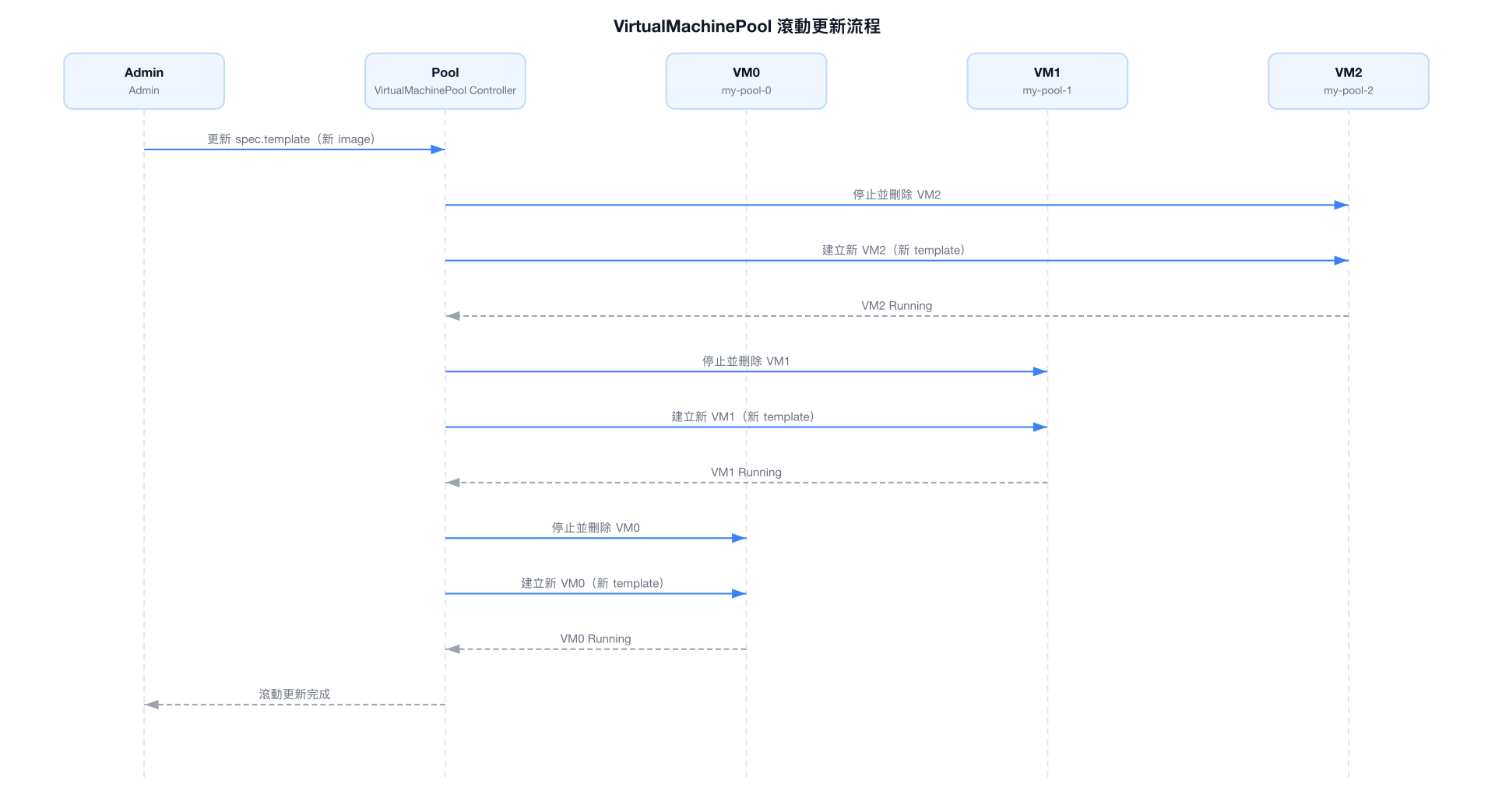
- 支援滾動更新(Rolling Update)
- 每個 VM 有唯一名稱,格式為
<pool-name>-<index>(如my-pool-0,my-pool-1)
與 Kubernetes StatefulSet 類比
| Kubernetes | KubeVirt |
|---|---|
| StatefulSet | VirtualMachinePool |
| Pod (with PVC) | VirtualMachine (with DataVolume) |
| Pod-0, Pod-1... | my-pool-0, my-pool-1... |
適用場景
- 資料庫叢集:每個 VM 有獨立資料磁碟(PostgreSQL, MySQL 叢集)
- 有狀態服務群:需要持久化設定或資料
- 開發/測試環境:每個開發者一個 VM,保持獨立狀態
- VDI(虛擬桌面):每個使用者一個 VM,持久化個人資料
VMIRS vs VirtualMachinePool 完整對比
| 比較維度 | VirtualMachineInstanceReplicaSet | VirtualMachinePool |
|---|---|---|
| 管理的資源 | VMI(直接) | VM(包含 VMI) |
| 儲存類型 | Ephemeral(containerDisk) | 持久 PVC(DataVolume) |
| VM 狀態 | 無狀態 | 有狀態 |
| 每個副本 PVC | ❌ 無 | ✅ 獨立 PVC |
| 更新策略 | 無(替換) | RollingUpdate / OnDelete |
| 重啟行為 | 新 VMI 從 image 啟動 | VM 重啟,資料保留 |
| 副本識別 | 隨機 UID | 有序索引(-0, -1, -2) |
| 縮容行為 | 刪除任意 VMI | 刪除最大索引的 VM(及 PVC) |
| 擴容行為 | 建立新 VMI | 建立新 VM + DataVolume |
| HPA 支援 | ✅ | ✅ |
| Paused 支援 | ✅ | ✅ |
| 類比 K8s 資源 | ReplicaSet | StatefulSet |
| 主要使用場景 | 無狀態計算、批次 | 有狀態應用、VDI |
VMIRS Spec 完整說明
apiVersion: kubevirt.io/v1
kind: VirtualMachineInstanceReplicaSet
metadata:
  name: my-vmirs
  namespace: default
spec:
  replicas: 3                    # 期望的 VMI 副本數量
  paused: false                  # true 時暫停 reconcile(不建立/刪除 VMI)
  selector:
    matchLabels:
      kubevirt.io/vmirs: my-vmirs  # 必須與 template.metadata.labels 一致
  template:
    metadata:
      labels:
        kubevirt.io/vmirs: my-vmirs
        app: batch-worker
    spec:                        # 完整 VMI spec,與獨立 VMI 相同
      domain:
        cpu:
          cores: 2
        memory:
          guest: 2Gi
        devices:
          disks:
            - name: rootdisk
              disk:
                bus: virtio
          interfaces:
            - name: default
              masquerade: {}
              model: virtio
      networks:
        - name: default
          pod: {}
      volumes:
        - name: rootdisk
          containerDisk:
            image: quay.io/containerdisks/fedora:latest
      terminationGracePeriodSeconds: 30
      evictionStrategy: LiveMigrateIfPossible
VMIRS Spec 欄位說明
| 欄位 | 必填 | 說明 |
|---|---|---|
replicas | 否(預設 1) | 期望的 VMI 副本數 |
selector | 是 | LabelSelector,必須與 template labels 匹配 |
template | 是 | VMITemplateSpec,定義每個 VMI 的 spec |
paused | 否(預設 false) | 暫停 Controller 的 reconcile 循環 |
Selector 一致性
spec.selector 必須與 spec.template.metadata.labels 一致,否則 Controller 將拒絕建立資源。建立後 selector 不可修改。
VirtualMachinePool Spec 完整說明
apiVersion: pool.kubevirt.io/v1alpha1
kind: VirtualMachinePool
metadata:
  name: my-vm-pool
  namespace: default
spec:
  replicas: 3
  paused: false
  selector:
    matchLabels:
      kubevirt.io/vmpool: my-vm-pool
  updateStrategy:
    type: RollingUpdate            # RollingUpdate 或 OnDelete
    rollingUpdate:
      maxUnavailable: 1            # 最多同時不可用的 VM 數(或百分比)
      maxSurge: 0                  # 最多同時超出 replicas 的 VM 數
  template:
    metadata:
      labels:
        kubevirt.io/vmpool: my-vm-pool
        app: stateful-service
    spec:                          # 完整 VM spec
      runStrategy: Always
      dataVolumeTemplates:
        - metadata:
            name: rootdisk         # 實際名稱會加上 VM 索引後綴
          spec:
            source:
              registry:
                url: "docker://quay.io/containerdisks/ubuntu:22.04"
            storage:
              accessModes:
                - ReadWriteOnce
              resources:
                requests:
                  storage: 20Gi
              storageClassName: standard
      template:
        metadata:
          labels:
            kubevirt.io/vmpool: my-vm-pool
        spec:
          domain:
            cpu:
              cores: 4
              sockets: 1
            memory:
              guest: 8Gi
            devices:
              disks:
                - name: rootdisk
                  disk:
                    bus: virtio
                - name: cloudinitdisk
                  cdrom:
                    bus: sata
              interfaces:
                - name: default
                  masquerade: {}
                  model: virtio
          networks:
            - name: default
              pod: {}
          volumes:
            - name: rootdisk
              dataVolume:
                name: rootdisk     # 對應 dataVolumeTemplates[].metadata.name
            - name: cloudinitdisk
              cloudInitNoCloud:
                userData: |
                  #cloud-config
                  user: ubuntu
                  password: ubuntu
                  chpasswd:
                    expire: false
VirtualMachinePool UpdateStrategy 說明
| 策略 | 說明 | 適用場景 |
|---|---|---|
| RollingUpdate | 滾動更新,按順序更新每個 VM | 需要高可用的服務群 |
| OnDelete | 僅在 VM 被手動刪除時才更新 | 需要手動控制更新節奏 |
Status 欄位說明
VMIRS 與 VirtualMachinePool 的 Status 結構相似:
status:
  replicas: 3              # 目前存在的副本數(包含不健康的)
  readyReplicas: 3         # Ready 狀態的副本數
  availableReplicas: 3     # 可用副本數(Running 且 Ready)
  labelSelector: "app=my-app"  # HPA 用來查詢 Pod 的 selector

  conditions:
    - type: ReplicaFailure   # 副本建立/刪除失敗
      status: "False"
      reason: ""
      message: ""
    - type: ReplicaPaused    # 是否暫停(spec.paused = true)
      status: "False"
Conditions 說明
| Condition 類型 | 說明 |
|---|---|
ReplicaFailure | 建立或刪除副本時發生錯誤(如資源不足、PVC 無法建立) |
ReplicaPaused | Controller reconcile 已暫停(spec.paused: true) |
HPA 整合說明
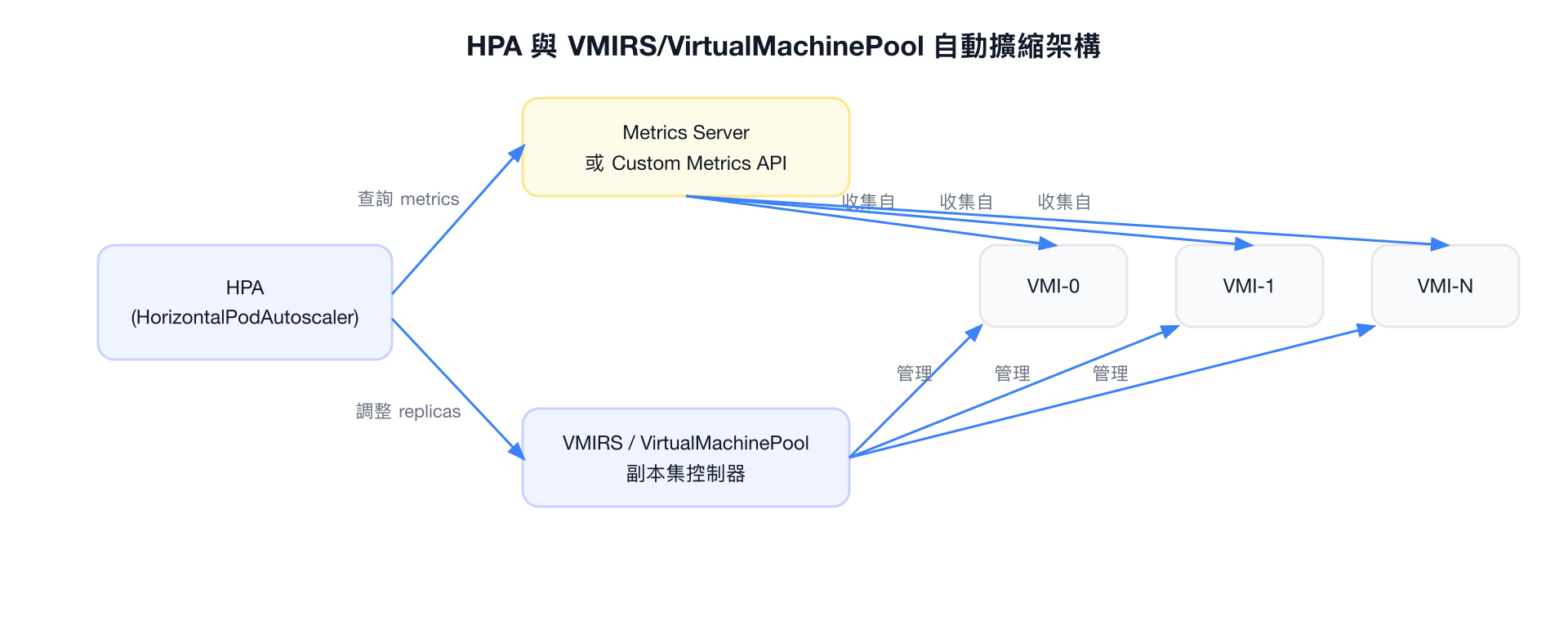
HorizontalPodAutoscaler 可根據指標自動調整 VMIRS 或 VirtualMachinePool 的副本數。
HPA 如何與 VMIRS/Pool 搭配
HPA 的 scaleTargetRef
HPA 的 scaleTargetRef 需要指向 VMIRS 或 VirtualMachinePool,KubeVirt 已實作對應的 Scale subresource。
HPA 設定 VMIRS
apiVersion: autoscaling/v2
kind: HorizontalPodAutoscaler
metadata:
  name: vmirs-hpa
  namespace: default
spec:
  scaleTargetRef:
    apiVersion: kubevirt.io/v1
    kind: VirtualMachineInstanceReplicaSet
    name: my-vmirs
  minReplicas: 2
  maxReplicas: 10
  metrics:
    - type: Resource
      resource:
        name: cpu
        target:
          type: Utilization
          averageUtilization: 70
    - type: Pods
      pods:
        metric:
          name: vm_custom_workload
        target:
          type: AverageValue
          averageValue: "100"
  behavior:
    scaleUp:
      stabilizationWindowSeconds: 60
      policies:
        - type: Pods
          value: 2
          periodSeconds: 60
    scaleDown:
      stabilizationWindowSeconds: 300
      policies:
        - type: Pods
          value: 1
          periodSeconds: 120
HPA 設定 VirtualMachinePool
apiVersion: autoscaling/v2
kind: HorizontalPodAutoscaler
metadata:
  name: vmpool-hpa
  namespace: default
spec:
  scaleTargetRef:
    apiVersion: pool.kubevirt.io/v1alpha1
    kind: VirtualMachinePool
    name: my-vm-pool
  minReplicas: 3
  maxReplicas: 20
  metrics:
    - type: Resource
      resource:
        name: cpu
        target:
          type: Utilization
          averageUtilization: 60
    - type: Resource
      resource:
        name: memory
        target:
          type: AverageValue
          averageValue: 6Gi
HPA 與有狀態 VM 的注意事項
對 VirtualMachinePool 使用 HPA 進行縮容時,被刪除的 VM 及其 PVC 也會一起刪除(資料遺失)。請確保工作負載設計支援動態縮容,或設定適當的 minReplicas 下限。
完整 YAML 範例
VMIRS 範例(無狀態 VM 群組)
apiVersion: kubevirt.io/v1
kind: VirtualMachineInstanceReplicaSet
metadata:
  name: batch-workers
  namespace: compute
  labels:
    app: batch-processing
spec:
  replicas: 5
  paused: false
  selector:
    matchLabels:
      kubevirt.io/vmirs: batch-workers
      workload-type: batch
  template:
    metadata:
      labels:
        kubevirt.io/vmirs: batch-workers
        workload-type: batch
    spec:
      terminationGracePeriodSeconds: 60
      evictionStrategy: LiveMigrateIfPossible
      domain:
        cpu:
          cores: 4
          sockets: 1
          threads: 1
        memory:
          guest: 8Gi
        machine:
          type: q35
        devices:
          blockMultiQueue: true
          networkInterfaceMultiqueue: true
          disks:
            - name: rootdisk
              disk:
                bus: virtio
              bootOrder: 1
            - name: initdisk
              cdrom:
                bus: sata
          interfaces:
            - name: default
              masquerade: {}
              model: virtio
          rng: {}
        resources:
          requests:
            cpu: "4"
            memory: 8Gi
      networks:
        - name: default
          pod: {}
      volumes:
        - name: rootdisk
          containerDisk:
            image: quay.io/my-org/batch-worker:v2.1.0
        - name: initdisk
          cloudInitNoCloud:
            userData: |
              #cloud-config
              write_files:
                - path: /etc/batch/config.yaml
                  content: |
                    queue_url: amqp://rabbitmq.default.svc/jobs
                    worker_id: ${HOSTNAME}
              runcmd:
                - systemctl enable --now batch-worker
VirtualMachinePool 範例(有狀態 VM 群組,含 DataVolumeTemplates)
apiVersion: pool.kubevirt.io/v1alpha1
kind: VirtualMachinePool
metadata:
  name: postgres-cluster
  namespace: databases
  labels:
    app: postgres
    tier: database
spec:
  replicas: 3
  paused: false
  selector:
    matchLabels:
      kubevirt.io/vmpool: postgres-cluster
  updateStrategy:
    type: RollingUpdate
    rollingUpdate:
      maxUnavailable: 1
      maxSurge: 0
  template:
    metadata:
      labels:
        kubevirt.io/vmpool: postgres-cluster
        app: postgres
    spec:
      runStrategy: Always
      dataVolumeTemplates:
        - metadata:
            name: os-disk
          spec:
            source:
              registry:
                url: "docker://quay.io/containerdisks/ubuntu:22.04"
            storage:
              accessModes:
                - ReadWriteOnce
              resources:
                requests:
                  storage: 20Gi
              storageClassName: ceph-rbd
        - metadata:
            name: data-disk
          spec:
            source:
              blank: {}
            storage:
              accessModes:
                - ReadWriteOnce
              resources:
                requests:
                  storage: 200Gi
              storageClassName: ceph-rbd-high-iops
      template:
        metadata:
          labels:
            kubevirt.io/vmpool: postgres-cluster
            app: postgres
        spec:
          terminationGracePeriodSeconds: 120
          evictionStrategy: LiveMigrateIfPossible
          domain:
            cpu:
              cores: 8
              sockets: 1
              threads: 2
            memory:
              guest: 32Gi
              hugepages:
                pageSize: "2Mi"
            machine:
              type: q35
            devices:
              blockMultiQueue: true
              networkInterfaceMultiqueue: true
              disks:
                - name: os-disk
                  disk:
                    bus: virtio
                  bootOrder: 1
                  dedicatedIOThread: true
                - name: data-disk
                  disk:
                    bus: virtio
                    cache: none
                    io: native
                  dedicatedIOThread: true
                - name: cloudinitdisk
                  cdrom:
                    bus: sata
              interfaces:
                - name: default
                  masquerade: {}
                  model: virtio
            resources:
              requests:
                cpu: "8"
                memory: 32Gi
              limits:
                cpu: "8"
                memory: 32Gi
            ioThreadsPolicy: auto
          networks:
            - name: default
              pod: {}
          volumes:
            - name: os-disk
              dataVolume:
                name: os-disk
            - name: data-disk
              dataVolume:
                name: data-disk
            - name: cloudinitdisk
              cloudInitNoCloud:
                userData: |
                  #cloud-config
                  user: ubuntu
                  password: ubuntu
                  chpasswd:
                    expire: false
                  packages:
                    - postgresql-15
                  runcmd:
                    - |
                      if [ ! -d /var/lib/postgresql/15/main ]; then
                        pg_createcluster 15 main
                        systemctl enable --now postgresql@15-main
                      fi
HPA 範例
---
# VMIRS HPA - CPU 使用率驅動擴縮
apiVersion: autoscaling/v2
kind: HorizontalPodAutoscaler
metadata:
  name: batch-workers-hpa
  namespace: compute
spec:
  scaleTargetRef:
    apiVersion: kubevirt.io/v1
    kind: VirtualMachineInstanceReplicaSet
    name: batch-workers
  minReplicas: 2
  maxReplicas: 20
  metrics:
    - type: Resource
      resource:
        name: cpu
        target:
          type: Utilization
          averageUtilization: 75
  behavior:
    scaleUp:
      stabilizationWindowSeconds: 30
      policies:
        - type: Pods
          value: 3
          periodSeconds: 60
    scaleDown:
      stabilizationWindowSeconds: 600
      policies:
        - type: Pods
          value: 1
          periodSeconds: 120

---
# VirtualMachinePool HPA
apiVersion: autoscaling/v2
kind: HorizontalPodAutoscaler
metadata:
  name: postgres-hpa
  namespace: databases
spec:
  scaleTargetRef:
    apiVersion: pool.kubevirt.io/v1alpha1
    kind: VirtualMachinePool
    name: postgres-cluster
  minReplicas: 3
  maxReplicas: 9
  metrics:
    - type: Resource
      resource:
        name: cpu
        target:
          type: Utilization
          averageUtilization: 60
常用操作指令
# ===== VMIRS 操作 =====

# 查詢所有 VMIRS
kubectl get vmirs -n <namespace>
kubectl get virtualmachineinstancereplicaset -n <namespace>

# 查詢 VMIRS 詳細資訊
kubectl describe vmirs <vmirs-name> -n <namespace>

# 擴縮 VMIRS 副本數
kubectl scale vmirs <vmirs-name> --replicas=5 -n <namespace>

# Patch VMIRS 副本數
kubectl patch vmirs <vmirs-name> -n <namespace> \
  --type=merge -p '{"spec":{"replicas":5}}'

# 暫停 VMIRS reconcile
kubectl patch vmirs <vmirs-name> -n <namespace> \
  --type=merge -p '{"spec":{"paused":true}}'

# 查看 VMIRS 管理的 VMI
kubectl get vmi -n <namespace> -l "kubevirt.io/vmirs=<vmirs-name>"

# 查看 VMIRS Replica 狀態
kubectl get vmirs <vmirs-name> -n <namespace> \
  -o jsonpath='{.status.readyReplicas}/{.status.replicas}'

# ===== VirtualMachinePool 操作 =====

# 查詢所有 VirtualMachinePool
kubectl get vmpool -n <namespace>
kubectl get virtualmachinepool -n <namespace>

# 查詢 Pool 詳細資訊
kubectl describe vmpool <pool-name> -n <namespace>

# 擴縮 Pool 副本數
kubectl scale vmpool <pool-name> --replicas=5 -n <namespace>

# 查看 Pool 管理的 VM
kubectl get vm -n <namespace> -l "kubevirt.io/vmpool=<pool-name>"

# 查看 Pool 的所有 VM 狀態
kubectl get vm -n <namespace> -l "kubevirt.io/vmpool=<pool-name>" \
  -o custom-columns='NAME:.metadata.name,STATUS:.status.printableStatus,READY:.status.ready'

# 查看某個 Pool VM 的 VMI
kubectl get vmi -n <namespace> -l "kubevirt.io/vmpool=<pool-name>"

# 強制更新特定 VM(OnDelete 策略)
kubectl delete vm <pool-name>-2 -n <namespace>
# Pool Controller 會自動重建 my-pool-2

# ===== 通用操作 =====

# 查看 HPA 狀態
kubectl get hpa -n <namespace>
kubectl describe hpa <hpa-name> -n <namespace>

# 觀察 HPA 擴縮過程
kubectl get hpa <hpa-name> -n <namespace> -w

# 查看 Events
kubectl get events -n <namespace> \
  --field-selector involvedObject.name=<vmirs-or-pool-name> \
  --sort-by='.metadata.creationTimestamp'
使用 watch 監控副本狀態
# 持續監控 VMIRS 副本數
watch -n 2 "kubectl get vmirs -n <namespace> && kubectl get vmi -n <namespace>"
縮容時的資料安全(VirtualMachinePool)
VirtualMachinePool 縮容時,會優先刪除索引最大的 VM。被刪除 VM 的 DataVolume(PVC)也會一併刪除。若需要保留資料,請在縮容前先手動備份或複製相關 PVC。